Why Use Models in System and Product Design?
model /mŏd′l/
noun
A small object, usually built to scale, that represents in detail another, often larger object.
A preliminary work or construction that serves as a plan from which a final product is to be made.
What you should use instead of screens to design digital products.
TL:DR
Using product and systems models—instead of detailed screens—in early stages of product definition and design identifies and validates requirements, gives the product team (Product Management, Development, and Design) insights needed to make major architectural and business decisions with confidence, speeds the delivery of front end screens and flows, and unblocks development [1].
I’ve written two detailed, real-world use cases demonstrating how I used models to define product requirements and make design decisions. All content, conflicts, insights, and conclusions are true, though I have updated some of the visualizations for consistency. I tell the stories linearly, but in practice each project had plenty of revisions, rejections, and updates.
Names have been removed to protect the innocent.
There’s an elephant in the room
At the start of every product definition process the extended product team produces a slew of requirements in an effort to describe a future product. But it’s incredibly hard to turn a mixed list of business, technical, and design requirements into a coherent product vision. This is the a high-tech version of the old parable about sightless people describing an elephant. Each person describes the elephant differently—as a wall, a column, or a spear—depending upon what part of the elephant they touch. Each member of the product team describes the product differently—as a business opportunity, a technical achievement, or a design solution—depending on their area of expertise.
At the end of product planning cycle, the odds that every member of the product team shares a common product vision are very low—no matter how sincerely everyone thinks they’re aligned.
“When can you get us some screens?”
Which is why product teams want to see detailed, designed screens ASAP. Design deliverables soon become de facto requirements docs and everyone hopes that the next revision will be the moment Design gets it “right” and unblocks Development.
It’s unintuitive, but relying on detailed screen designs—even rough wireframes—too early in the product definition process actually slows things down. After every product review Design fixes mistakes, adds new requirements, creates, updates, and discards dozens of ever-more complicated screens and functional flows in an attempt to get things “right”. This takes increasing amounts of time—with or without the help of AI. [2]
Working with screens severely limits the breadth of product issues that a product team can consider at any point in time. This increases the chance that the team will overlook one or more critical requirements (see either use case above) until it’s too late to address them.
Models are better, cheaper, and faster than screens
A model can present a top-down view of a single feature, an entire product, or, most powerfully, a complete system. A model can show connections, relationships and product architectures that would be impossible to show or describe in a set of screens or flows.
A model is easier to build, modify, and maintain than any set of screens and flows. A model can be any combination of flow charts, data flows, architectural diagrams, user journeys, text tables or any other visualization method needed to describe issues and capture decisions.
The current version of any model provides the context needed to allow the product team to make their next set of technical, business, or design decisions with confidence.
A model has no set resolution or level of detail. A model gains more detail each time it is updated after a product decision. A model will soon have sufficient detail about things like the overall product architecture and fundamental features (e.g. an account creation flow) to allow Development to begin foundational work long before the delivery of screens. In fact, a model can eventually have sufficient detail to pre-define every element on every screen.
And that’s a good time to start designing screens.
What’s the difference between a product model and a system model?
It’s mostly about scope and purpose. A product model, for the most part, places multiple features of a single product (see the Amazon Kindle eReader OOBE▸ use case) into a context which helps the product team make increasingly detailed decisions.
A system model (see the ACME B2B Reseller Platform▸ use case) places a product model into an even larger context which includes factors over which the product team has limited-to-no control but which must be accommodated in the final product definition. These may include internal legacy systems which the product must integrate with but which cannot be modified, third-party services with established APIs (e.g. Square for credit card transaction), and—most important of all—established business practices which are simply too entrenched and which will never change no matter what benefits the product may bring. For example, the best designed client-management system will fail if it doesn’t meet applicable governance and privacy standards.
Long-term product vision? Short-term scope reduction? A system model can help with both.
A huge benefit of working with system models is their broad scope. A system model will often identify opportunities well-beyond current schedules, resources, and goals. These opportunities are typically so large they do not contribute to short-term scope creep. Capturing these opportunities in a future roadmap or vision, however broadly defined, can help product teams avoid making short-term decisions which could limit future innovation.
Conversely, a system model can help product teams reduce product scope when inevitable problems and delays arise while still delivering a consistent, holistic, and compelling product experience.
How to build a model.
“Begin at the beginning and go on till you come to the end; then stop.”
—Lewis Carroll, Alice’s Adventures in Wonderland (1865)
You create models to arrive at consensus about product definition, requirements, customers, or competition—whatever factors the product team deems important for making the next round of decisions.
You build models incrementally, beginning with the most basic concepts. Early models may seem ridiculously simple and obvious. That’s OK. You want consensus at every step because eventually you’ll come to a point where members of the team disagree about what the model represents. This is a huge opportunity for further research and alignment. Once a model is “correct” at its current level of detail, the team can use it as the basis for the next round of product decisions.
You update the model accordingly, adding complexity and detail. And review it again. And make more decisions. And update the model again, as many times as needed.
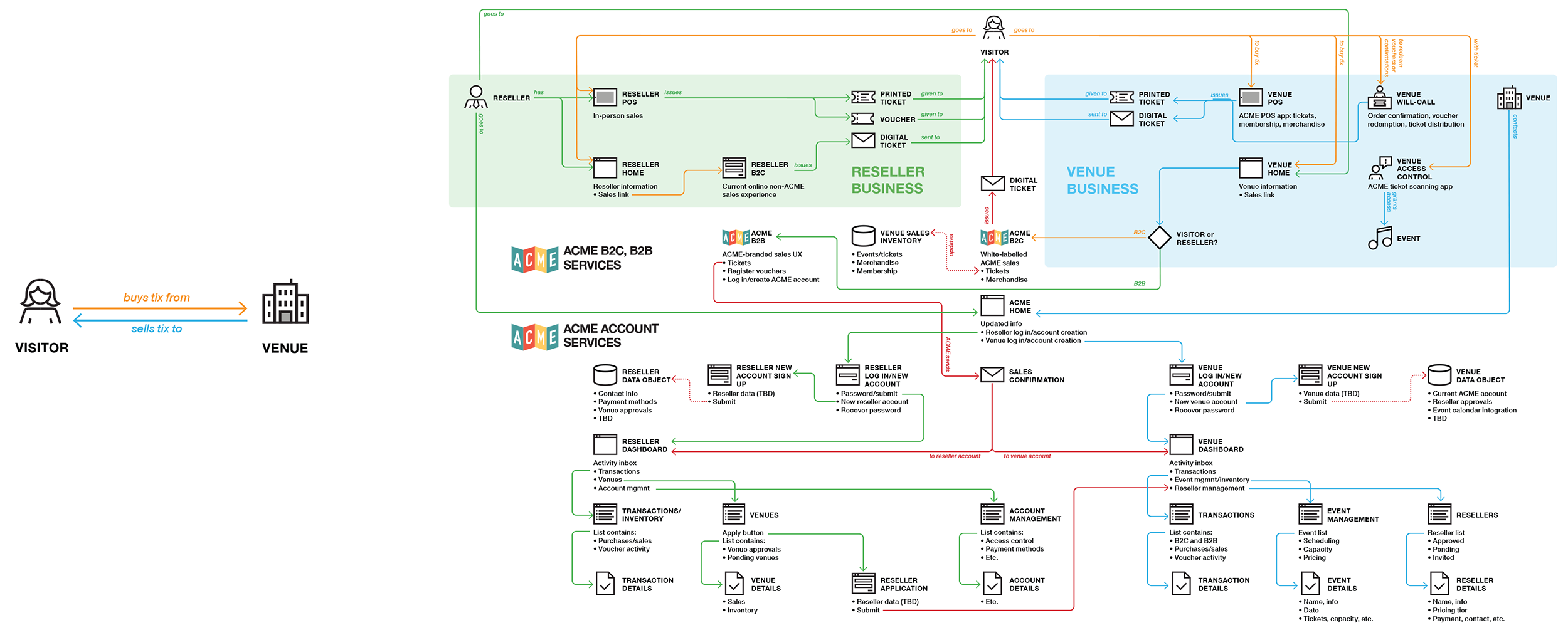
On the left, the first version of the ACME B2B System Model. On the right, the “final” version.
[1] If that doesn’t make you want to read further, I don’t know what will.
[2] Using AI in conjunction with models can yield tremendous productivity breakthroughs. But I’ve yet to see a prompt which can get any AI client to document the full set of requirements which bound any given product definition. A human designer will always need to know the larger context behind the prompts.